-1.png?width=360&height=66&name=Untitled%20design%20(4)-1.png)
This article applies to those with role of ConexED Administrator
Virtual meetings held in one stop shop and the Virtual Event Space are archived on the Meetings page of the Admin User Panel. There will be an entry for meetings of all modality, even when the meeting is not recorded or attended. Only a ConexED Admin can access meeting archives for meetings they did not moderate and did not attend.
Open the Admin Panel using the Gear Icon. Navigate to Meetings Tab. On the Meetings page, the meetings are displayed in table form, as shown below in Figure 1.
Figure 1
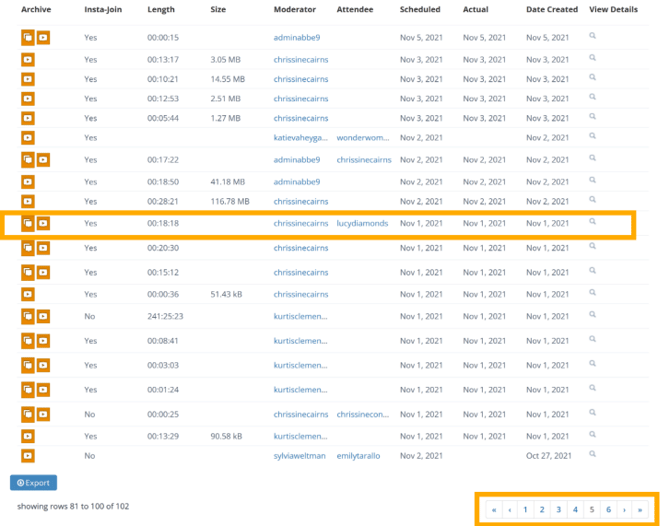
The meeting entry data is categorized by the column headings shown in Figure 2. The details of each column heading follow figure 2 below.
Figure 2

- Archive: The archive provides all internal meeting activities: moderator and attendee video
streams (if recorded), chat, captions, and transcripts. - Insta-Join: A “yes” indicates the meeting began with a Knock on Door or the Enter Virtual Space button.
- Length: Displays the actual meeting duration. Click to sort by shortest or longest.
- Size: Amount of stored data in ConexED’s encrypted cloud.
- Moderator: The host of the meeting. Hover over or click their name for details.
- Attendee: The student or meeting participant.
- Scheduled: The date the meeting was scheduled.
- Actual: The actual date the meeting occurred.
- Date Created: The date the meeting was added to the calendar.
- View Details: Opens meeting details, including uploaded files and reminder emails.